

Your Firebase Cloud Firestore Database Has Insecure Rules
The Symptom
This happened about a month ago. I got an email like this from Google Firebase.
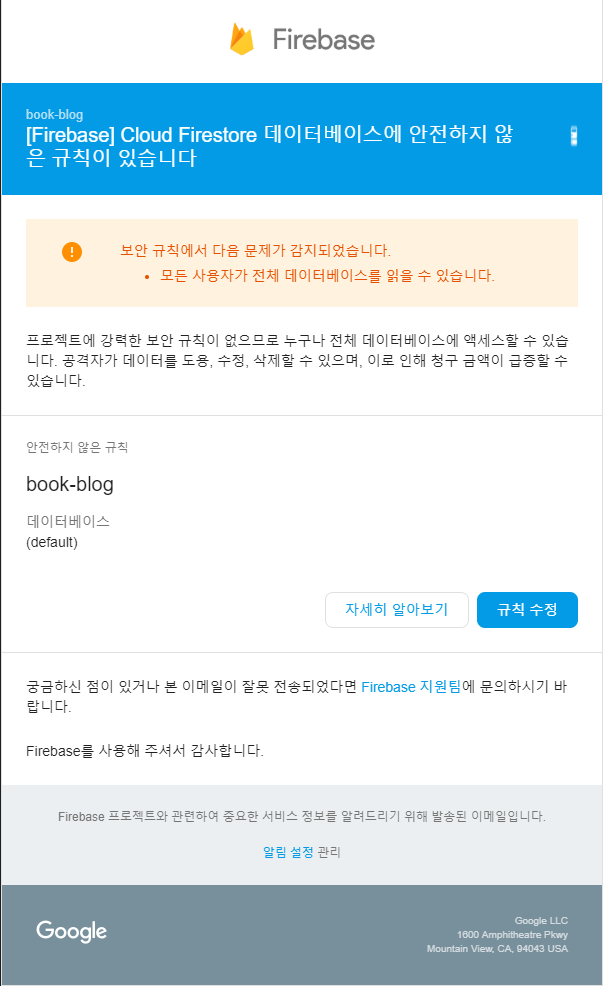
It said that my blog was at risk.
The Cause
It was because I had set up Cloud Firestore’s security rules carelessly.
The code below shows the security rules I had configured. The security vulnerabilities are as follows.
- Every document path is accessible. See line 3 of the code below.
- Read access is unconditionally allowed. See line 4 of the code below.
service cloud.firestore {
  match /databases/{database}/documents {
    match /{document=**} {
      allow read;
      allow write: if request.auth != null;
    }
  }
}
The Fix
- I made it so that only the Post documents are accessible. See line 3 of the code below.
- I granted permission so that read is only allowed for documents where show == true. See line 4 of the code below.
service cloud.firestore {
  match /databases/{database}/documents {
    match /Post/{document=**} {
      allow read: if resource.data.show == true;
      allow write: if request.auth != null;
    }
  }
}
You can check this in the source code of this blog.
The End
Now the security alert emails no longer arrive. It was a ridiculous mistake I made as a Cloud Firestore beginner. I was embarrassed and almost decided not to post about it, but on the off chance that it might help someone, I’m tentatively sharing it here. I hope you don’t make the same mistake I did!
References
https://www.fullstackfirebase.com/cloud-firestore/security-rules https://firebase.google.com/docs/firestore/security/rules-query

Leave a comment