

Using MSSQL in Visual Studio Code (VS Code)
I’ve been using Microsoft SQL Server (hereafter mssql) with Visual Studio Code, and it’s really great. You can install it from here. Without having to launch the heavy SQL Server Management Studio, you can use mssql in a lightweight and convenient way.
Basic features like running simple CRUD queries are all covered in the tutorial, so you can just follow along. But that’s not all. Among the features not mentioned in the tutorial, I’ve put together the ones I use frequently.
1. Checking the definitions of procedures, functions & tables
- Procedures and functions
After exec, type the name of the procedure or function, right-click, and select Peek Definition (peeking).
exec getUserName -- Peeking the definition (Alt+F12) shows the definition of the procedure.
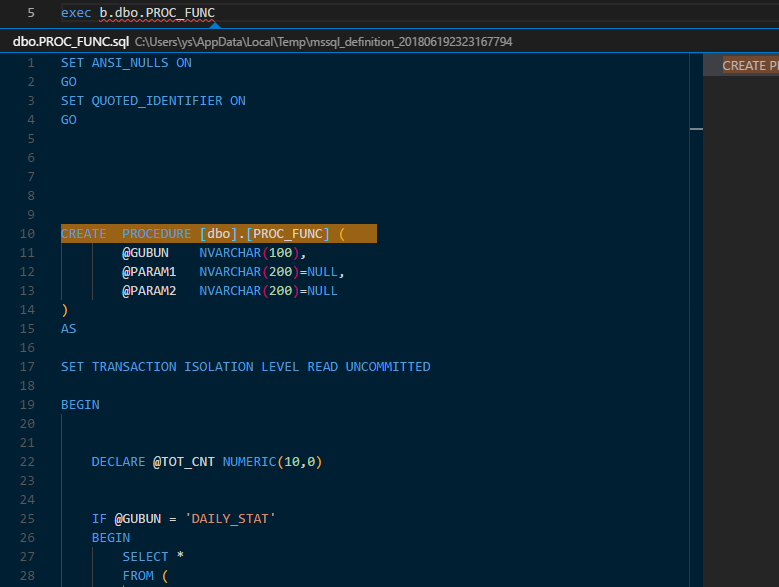
Selecting Go to Definition (F12) opens a new window and displays the create statement for that function or procedure.
- Tables
Of course, you can check table definitions the same way.
select *
from users -- Peeking the definition here (Alt+F12) shows the table definition.
Go to Definition (F12) also brings up the create statement in a new window, just like with procedures.
2. Checking missing parameters
If you want to check which parameters are required when running a procedure or function, here’s how.
- Press F8, or

- Just wait one second.
exec getUserName -- Type this and wait just one second, and the screen below appears.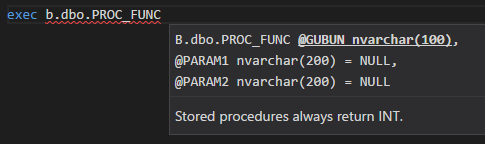
Done!

Leave a comment