
Running a Vue.js WebView on Android KitKat and Below
The Incident
I’m in charge of an Android hybrid app, and not long ago I applied Vue.js to one particular page. I thought it was running smoothly, but this afternoon a bug report came in. When I checked, the JavaScript in the part where I had applied Vue.js wasn’t running. The details are as follows.
- Device where the error occurred: LG GPad 8.0 LTE
- Android version: KitKat 4.4.2
At first glance, I suspected that maybe the JavaScript wasn’t executing properly because of the old Android version. Fortunately, remote debugging of Android devices is possible from the KitKat version onward. I downloaded the driver, plugged the device into my machine, and ran remote debugging. This error showed up.
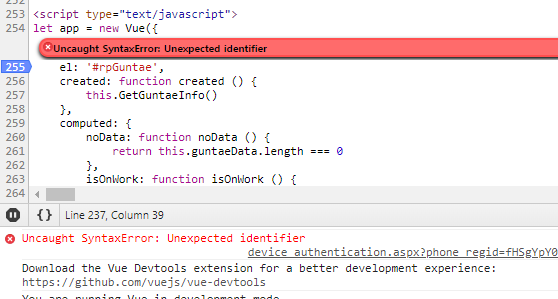
An Uncaught Syntax Error, of all things!!!
Debugging
-
Suspect 1: Vue.js
The first thing I suspected was Vue.js, since maybe Vue.js doesn’t support the WebView of old Android versions. So I searched around and found this answer. It’s an answer from Evan You.
We do support all the way down to 4.4.
-
Suspect 2: axios
The next thing I suspected was axios. To use axios in IE8, you need to add a Promise polyfill. But that didn’t fix it either.
-
Suspect 3: ECMAScript 2015 (es6)
The next thing I suspected was ECMAScript 2015 (es6). I should have thought of this first when I saw the error message, but I had gotten so used to es6 that it took me a while to come up with it. Naturally, old versions of browsers don’t support es6. If I had run babel, this wouldn’t have happened. Better late than never, I ran the BABEL repl.
The Resolution
I ran the code converted to the old JavaScript syntax, and now it works fine. The error in the capture above was caused by using let. Naturally, es6 arrow functions and object destructuring don’t work either, so you have to write them in the old syntax. And that’s how the problem was solved.
Miscellaneous
-
Something I learned this time: starting from Android 4.4.3 KitKat, the WebView changed significantly. In versions before 4.4 KitKat, a prototype WebView written with Chromium was used, but in Android 4.4.3 KitKat, a WebView based on Chrome 30.0.0.0 is used (reference).
-
Among the users of the app in question, those on KitKat and lower versions were
2.2%. There are still quite a lot of users (?). -
I confirmed that Vue.js runs fine on Android Gingerbread as well.

Leave a comment