
Where does the scroll event fire?
Where does an HTML element’s scroll event fire? It’s a confusing question. Let me put it another way. When I trigger a scroll, which element catches the scroll event? Still confusing. Let me try again. On which element should I set the onscroll handler so that I can fire the scroll event exactly the way I want?
The answer is in the Elements tab of the browser developer tools.
Google Chrome browser
In the Elements tab of Google Chrome, it shows a scroll label. The onscroll event only works on the element that has the scroll label attached.
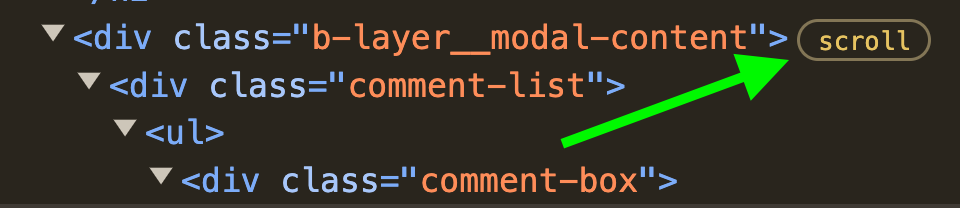
chrome version 130
Safari browser
It’s the same in the Safari browser.

In fact, it’s even better. If an element has an event attached, Safari shows an additional indicator. This is a feature Chrome doesn’t have.

Clicking the Event mark shows additional information as well. The event debugging that is cumbersome in Chrome becomes easy here.

safari version 18.1
Firefox
The Firefox browser is even better still. You can see at a glance even the code of the function attached to the scroll event. In the capture below, it shows React DOM’s dispatchContinuousEvent function. Truly the gold standard of developer tools.
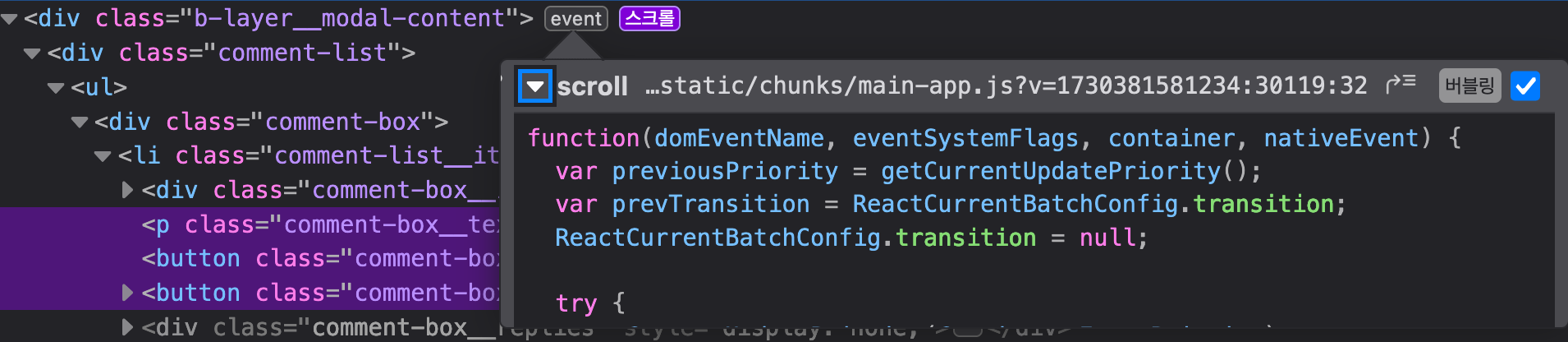
firefox version 132
When debugging gets stuck, it helps to try the developer tools of a different browser.
20241031

Leave a comment