

Upgrading to Yarn4 (feat. AWS)
A few days ago, Yarn4 was released. I had been planning to upgrade soon, but the problem hit me right away.
Environment
- Yarn3
- Node.js Corepack
- CI/CD using AWS CodePipeline
The Problem
A build error occurred in AWS Codebuild. The causes were:
- Yarn’s stable version changed from 3 -> 4
Corepack’s yarn setup script ran Yarn4, because I had written the script to run the stable version…- For an unknown reason, Yarn was being run with Node.js v16
- Node v16 cannot run yarn4, so the error occurred… (See the AWS Codebuild log below)
# Earlier output omitted..

Setting up nodejs (18.17.1-deb-1nodesource1) ...

[Container] 2023/10/30 01:10:45.684838 Running command corepack enable

[Container] 2023/10/30 01:10:48.270979 Running command corepack prepare yarn@stable --activate
Preparing yarn@stable for immediate activation...

[Container] 2023/10/30 01:10:50.170671 Running command yarn add env-cmd
Usage Error: This tool requires a Node version compatible with >=18.12.0 (got 16.20.1). Upgrade Node, or set `YARN_IGNORE_NODE=1` in your environment.

Yarn Package Manager - 4.0.1

  $ yarn <command>

You can also print more details about any of these commands by calling them with
the `-h,--help` flag right after the command name.

[Container] 2023/10/30 01:10:50.504655 Running command yarn add cross-env
Usage Error: This tool requires a Node version compatible with >=18.12.0 (got 16.20.1). Upgrade Node, or set `YARN_IGNORE_NODE=1` in your environment.

Yarn Package Manager - 4.0.1

  $ yarn <command>

You can also print more details about any of these commands by calling them with
the `-h,--help` flag right after the command name.

[Container] 2023/10/30 01:10:50.712425 Phase complete: INSTALL State: SUCCEEDED
[Container] 2023/10/30 01:10:50.712444 Phase context status code:  Message:

[Container] 2023/10/30 01:10:50.778867 Entering phase BUILD
[Container] 2023/10/30 01:10:50.779639 Running command yarn run build
Usage Error: This tool requires a Node version compatible with >=18.12.0 (got 16.20.1). Upgrade Node, or set `YARN_IGNORE_NODE=1` in your environment.

# Remaining output omitted...
...
The Cause
The problem is that Yarn4 ignores Node18 and runs on Node16. So should I configure corepack to run Yarn3 instead? That could be one approach, but I wanted to find a workaround.
That’s because the Node18 install script is already showing a deprecation warning.
(See the log below)
# Omitted...
[Container] 2023/10/30 01:09:20.175270 Running command curl -sL https://deb.nodesource.com/setup_18.x | bash -

================================================================================
▓▓▓▓▓▓▓▓▓▓▓▓▓▓▓▓▓▓▓▓▓▓▓▓▓▓▓▓▓▓▓▓▓▓▓▓▓▓▓▓▓▓▓▓▓▓▓▓▓▓▓▓▓▓▓▓▓▓▓▓▓▓▓▓▓▓▓▓▓▓▓▓▓▓▓▓▓▓▓▓
================================================================================

                           SCRIPT DEPRECATION WARNING


  This script, located at https://deb.nodesource.com/setup_X, used to
  install Node.js is deprecated now and will eventually be made inactive.

  Please visit the NodeSource distributions Github and follow the
  instructions to migrate your repo.
  https://github.com/nodesource/distributions

  The NodeSource Node.js Linux distributions GitHub repository contains
  information about which versions of Node.js and which Linux distributions
  are supported and how to install it.
  https://github.com/nodesource/distributions


                          SCRIPT DEPRECATION WARNING

================================================================================
▓▓▓▓▓▓▓▓▓▓▓▓▓▓▓▓▓▓▓▓▓▓▓▓▓▓▓▓▓▓▓▓▓▓▓▓▓▓▓▓▓▓▓▓▓▓▓▓▓▓▓▓▓▓▓▓▓▓▓▓▓▓▓▓▓▓▓▓▓▓▓▓▓▓▓▓▓▓▓▓
================================================================================

TO AVOID THIS WAIT MIGRATE THE SCRIPT
Continuing in 60 seconds (press Ctrl-C to abort) ...


## Installing the NodeSource Node.js 18.x repo...
# Omitted...
The Solution
-
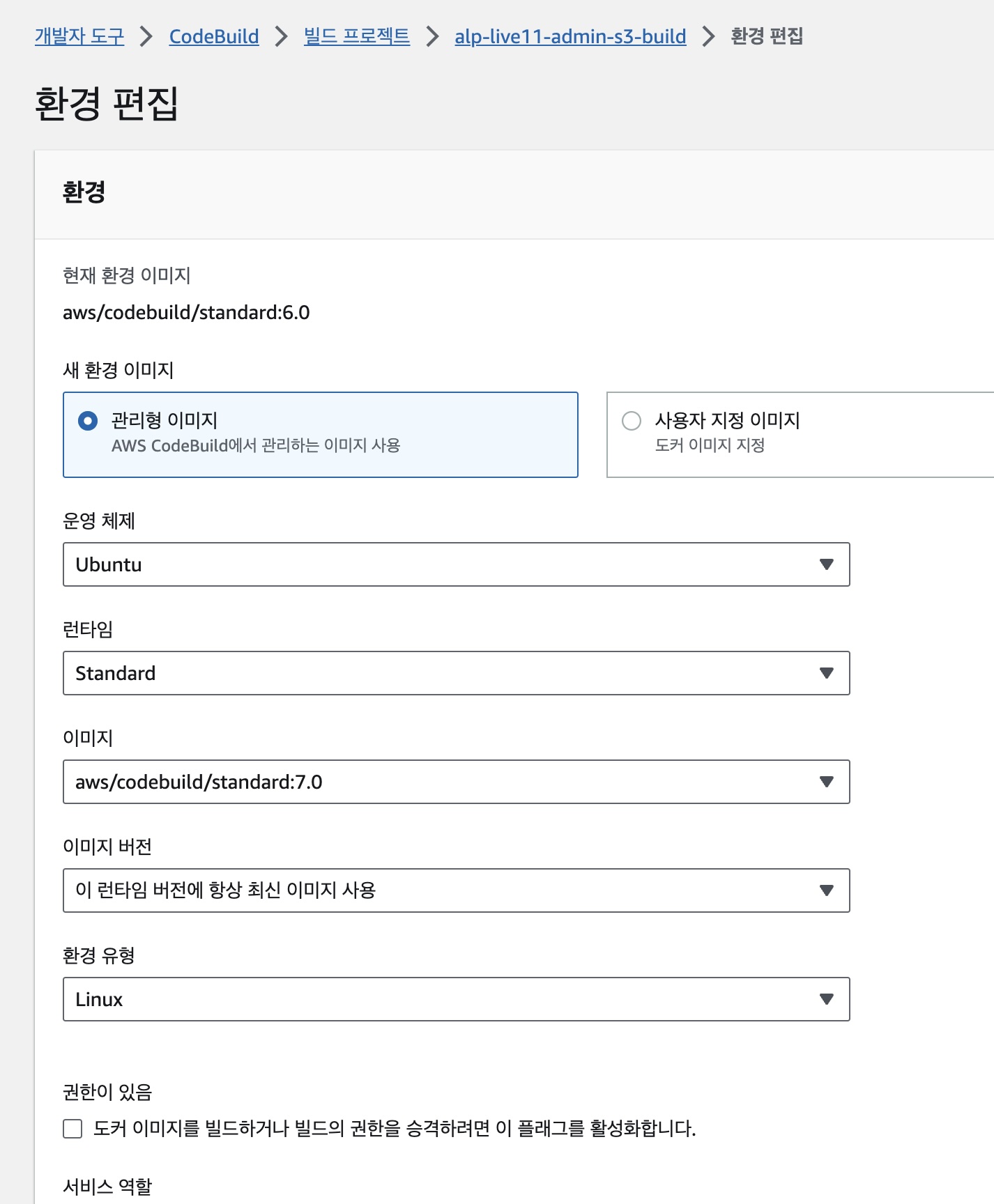
Upgrade the docker image used for builds in AWS Codebuild. The v7 image comes with Node18 already installed. So there’s no need to download and install Node18 in the build script.
-
Upgrade to yarn4. It’s really simple! Aside from this, there’s nothing else you need to do to upgrade to yarn4.
// package.json
{
  "name": "name",
  "version": "x.x.x",
  "packageManager": "yarn@4.0.1", // yarn4
  // ...
}
Results of the Improvement
- yarn3 -> yarn4: build speed improved by 9%
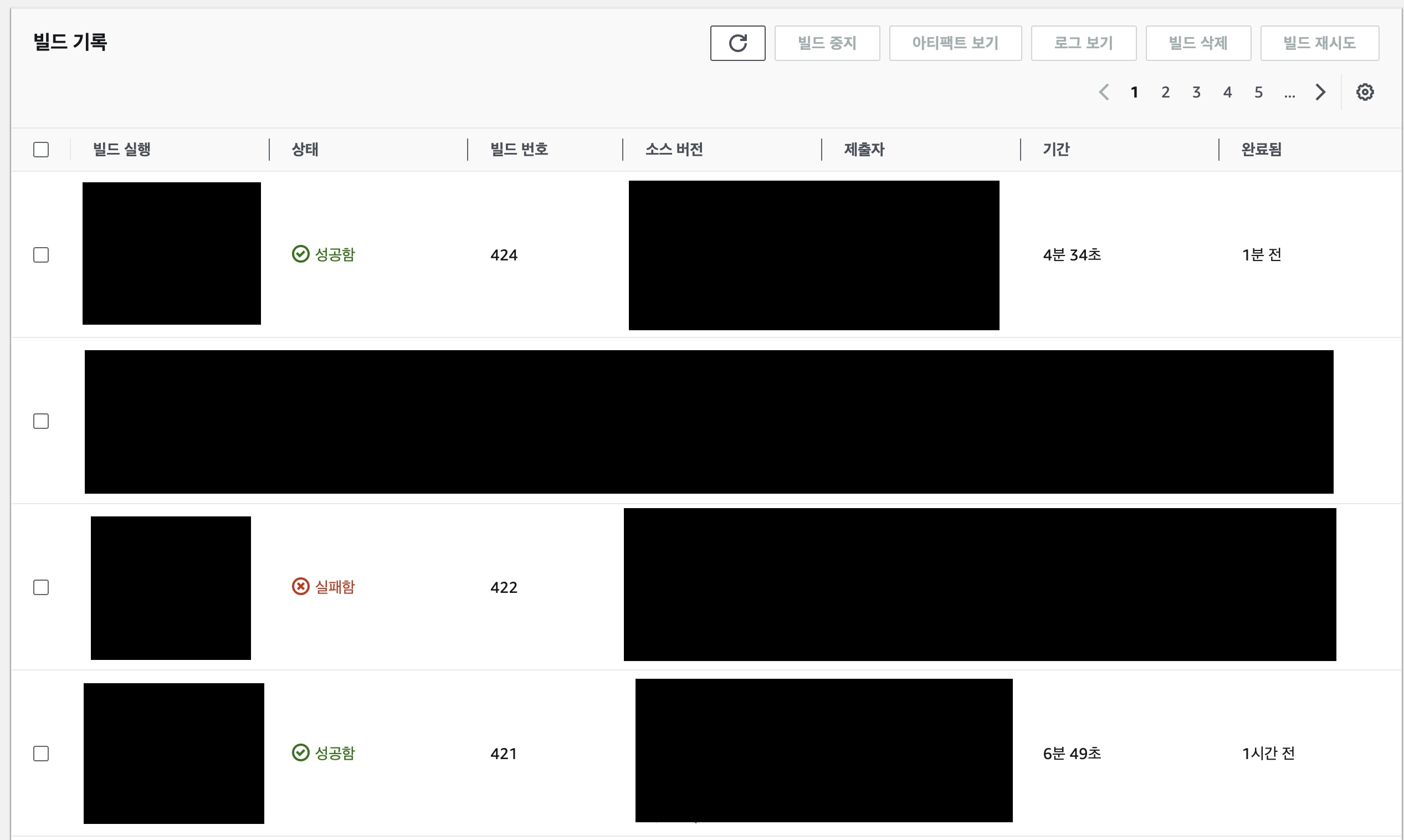
- AWS Codebuild: build speed improved by 33%
The End
Enjoy using Yarn4 with ease.
2023.11.03.

Leave a comment